This Power Automate workflow adds data to the same CSV file after each run. The most common use case is saving results of the workflow to a CSV log file. Of course, it would be a bit more complicated than my test scenario but the concept is exactly the same.
Pros of the workflow:
- puts the most recent data at the top of the CSV file;
- saves data into a single file rather than multiple (although each approach can have its use case);
- the latter makes it much easier to search through.
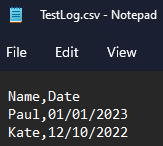
The initial file can be empty (just the headers) or have some matching data:

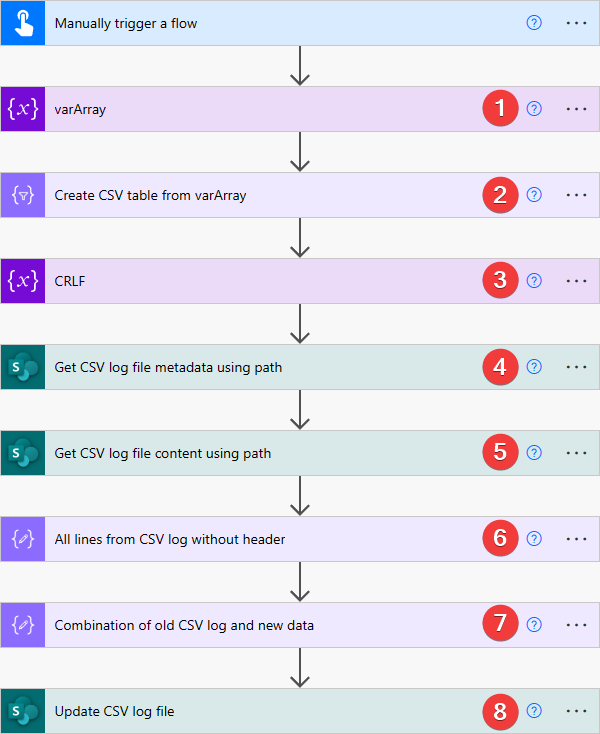
1) Initialize variable action – varArray variable (Array type). Value:
[
  {
    "Name": "John",
    "Date": "10/12/2022"
  },
  {
    "Name": "Jeff",
    "Date": "09/16/2022"
  }
]
2) Create CSV table action. From:
variables('varArray')
3) Initialize variable action – CRLF variable (String type). Value:
uriComponentToString('%0D%0A')
4) Get file metadata using path action. Peek code:
"parameters": {
    "dataset": "https://contoso.sharepoint.com",
    "path": "/Shared Documents/Logs/TestLog.csv"
}
5) Get file content using path action. Peek code:
"parameters": {
    "dataset": "https://contoso.sharepoint.com",
    "path": "/Shared Documents/Logs/TestLog.csv",
    "inferContentType": true
}
6) Compose action. Inputs:
skip(
    split(
        base64ToString(
            outputs('Get_CSV_log_file_content_using_path')?['body']?['$content']
        ),
        variables('CRLF')
    ),
    1
)
7) Compose action. Inputs:
concat(
    body('Create_CSV_table_from_varArray'),
    join(
        outputs('All_lines_from_CSV_log_without_header'),
        variables('CRLF')
    )
)
8) Update file action. Peek code:
"parameters": {
    "dataset": "https://contoso.sharepoint.com",
    "id": "@outputs('Get_CSV_log_file_metadata_using_path')?['body/Id']",
    "body": "@outputs('Combination_of_old_CSV_log_and_new_data')"
}
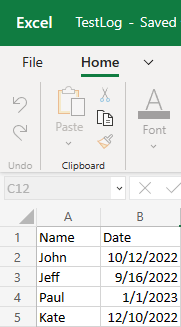
RESULT
As you can see, the data from varArray was added to the top of the CSV log file.
Could you expand on what you’re doing in step 3? I don’t understand what a CRLF is and what that step is accomplishing.
Hi Kevin,
Step 3 is just an “initialize variable” action that is renamed into “Carriage Return Line Feed” (CRLF) – you can define one by expanding it and pressing an “Enter” button inside of that variable.